
the recipe calculator FAQ
Does it use AI? No. Is it free? Yes. How is your data stored? Only on your device. Read more below about the scheckeats recipe calculator tool!

A follow-up to I built a smart recipe calculator, and I want you to try it.
Yesterday I shared the ScheckEats Recipe Calculator and asked for your feedback. I felt so grateful to see the enthusiasm on Instagram, especially. I am the kind of person who’ll work on something like this for 10 hours at a time when I’m inspired and in the zone, so it feels like it’s paying off when people like and use my tool.
If you haven’t tried my calculator yet, it’s the baking tool I always wished I had. There are a lot of programs that do aspects of what mine does, but nothing that combined all my needs in a way that didn’t feel tedious.
What even is a “recipe calculator”?
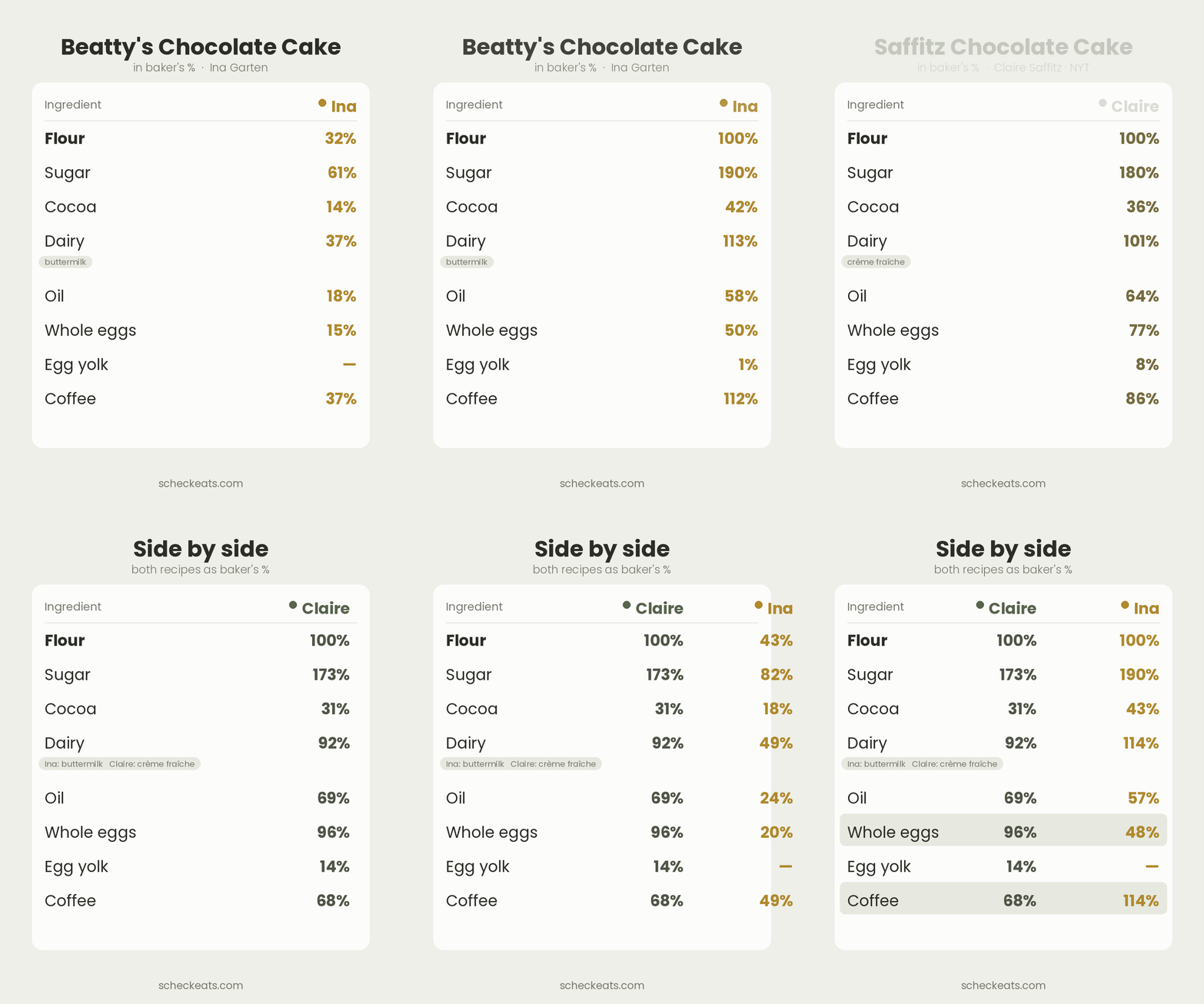
My tool can take a full written recipe, copy-and-pasted from your notes or a blog, and standardize the measurements, no matter whether the original was in grams, cups, or ounces. Then you can scale the recipe in practical ways, based on the pans you own or how much of an ingredient you have left. It also allows you to easily compare the structure of different recipes.
Does it use AI?
This was my most asked question! And the answer is no.
There’s no AI model anywhere in my calculator. Every number you see is calculated with arithmetic, like a simple spreadsheet or calculator, just more user-friendly.
Everyone is building AI tools and no one I know wants them!
It’s controversial these days, but I’m not completely against AI across the board. I hate AI art and the way AI “assistants” are shoved down our throats. But as I’ve said before, I don’t think it’s realistic at this point to completely avoid it, and I would rather explore what it might actually be good for. Today, almost all software is coded with the help of AI, which for someone like me who has no coding background, actually opens up a world I didn’t have access to before. A few months ago, I didn’t know what “vibe coding” was, and I certainly couldn’t have “vibe coded” this program without some help from AI. This is just my personal opinion, but I am open to the discourse.
All that said, in practice, my program is literally designed to reduce AI usage, because the hallucinations are real and scary!
(A quick note on how it reads your recipe: when you paste a recipe in, the parser matches each line against an internal database of ingredient weights, so “1 cup flour” becomes the right number of grams for flour specifically, not a generic guess. When it can’t confidently match a line, it asks you to clarify rather than guessing, and you can always override any row and type the amount yourself. Keep the feedback coming when something trips it up. That’s how the database gets better.)
Who is the ScheckEats calculator actually for?
Anyone who bakes and wants their results to be repeatable, scalable, and easily comparable. My tool is granular enough for professionals but easy enough for beginners. Even though I worked in a professional bakery for years, I’ve always considered myself a home cook first, and I built this with practical home use in mind.
Professionals will appreciate features like baker’s percentages, limiting-ingredient math, pan-fit ranking, and salt conversion. These are the tools of actual recipe development and test-kitchen work, not home-baking decoration. The difference from most professional software is that it’s free, there’s no account, and your formulas aren’t held behind a monthly subscription.
Is it really free?
Yes. There’s no subscription or log-in needed, either. This design also keeps your data private, since there’s nothing for me to store about you in the first place.
There is one unobtrusive ad at the bottom of the page. Hopefully that lets me make back a little of the time I pour into this, which is what keeps it free for everyone and lets me keep improving it. It doesn’t get in your way, and it doesn’t change how the tool works.
What is a baker’s percentage, exactly?
A baker’s percentage measures every ingredient using the flour as a baseline, which is always set to 100%. An ingredient’s percentage tells you its weight relative to the flour, not its share of the whole recipe, so other ingredients can go over 100%. It’s not about adding up to 100. A fudgy brownie, for instance, might have more sugar than flour and a good amount of butter, so you could see sugar at 150% and butter at 110%. Writing recipes this way makes them portable: you can scale to any batch size, compare two recipes fairly, and see at a glance what makes one richer or sweeter than another.
What’s the Compare tool, and why would I use it?
This is one of my favorite features. The Compare tool lines up two or more saved recipes side by side and translates them all into baker’s percentages, so you can read them on the same scale even when one was written in cups and another in grams for a totally different yield. It groups similar ingredients automatically too, so all-purpose flour lines up against bread flour, and one chocolate against another, instead of you squinting back and forth between two tabs.
Think of it as a recipe X-ray. Say you’ve got two chocolate chip cookie recipes and you can’t figure out why one bakes up chewy and the other crisp. Drop them both in and the answer usually jumps out: one has noticeably more brown sugar, or more butter, or an extra egg.
The Compare tool is amazing for recipe developers, or your own R&D.
How does the pan-size scaling work?
Pick the pan you want to bake in, tell it how full to fill it and what kind of batter it is, and the calculator works out the right batch to match. You can also have it rank every pan you own by how well that batch fits, using fill depth for rounds and loaves and cookie or cavity counts for sheet pans and muffin tins. If your batch would leave a pan half-empty, it says so and points you to a smaller one, so you’re not guessing whether a recipe will overflow your 9-inch. You can also adjust for batter density if you want to get specific.
Can it scale to a specific number of eggs?
Yes. Working as a professional, you might actually want to weigh out a partial egg (sounds oxymoronic, I know), and the tool lets you do that. But if you’d rather not crack an egg, scramble it, weigh it, and use part of it, you can scale to the number of whole eggs you have instead, and the rest of the recipe builds around that. It’s especially useful for cakes, custards, and enriched doughs, where the eggs are doing structural work.
How much can I make with what I have on hand?
Tell the calculator what you’ve actually got, like 100 g of flour, half a bag of chocolate, and three eggs, and it finds the ingredient that runs out first, then works out the biggest batch those amounts allow. It also tells you what you’ll have left over, and which of your pans that batch fits. It’s the answer to “can I even make this right now,” which is usually the real question. It’s basically limiting reagents from chemistry class, put to good use.
How does it address salt types?
Diamond Crystal, Morton’s, table salt, and Maldon are all “salt,” but they pack differently, so they’re not interchangeable by volume. Morton’s kosher is about twice as salty as Diamond Crystal spoon for spoon, because it’s denser. Swap one for the other 1:1 and you can wreck a dish. Tell the calculator which salt the recipe assumes and which one you actually have, and it sorts out the amount by weight so your food tastes the way it’s supposed to.
Can I save my own recipes?
Yes. Save a recipe and it’s there when you come back, stored right in your browser, with no account and nothing uploaded to a server. It also downloads a small backup file you can keep or move to another computer. Your data stays private and offline.
Can it convert cups to grams?
Yes. Cups, tablespoons, and teaspoons all convert to grams. Here’s why it’s not as simple as one magic number: a cup measures volume, a gram measures weight, and those two things only line up if everything weighs the same, which it doesn’t. A cup of flour and a cup of honey are nowhere near each other on a scale. So the calculator converts each ingredient by its own density instead of pretending a cup is a cup is a cup.
Should I bake by weight or by volume?
Weight is more reliable. One cup of flour can swing 20% or more depending on whether you scooped it or spooned it in, and that difference is the gap between a tender cake and a dense one. Grams don’t care how you scooped, since 120 g is always 120 g. That said, the tool works in volume too, so if cups and spoons are what you’ve got, you can stay in those and still scale and convert. Weighing just takes more of the guesswork out.
If you haven’t checked it out, here’s the link one more time: scheckeats.com/recipe-calculator
THANK YOU FOR YOUR SUPPORT AND FEEDBACK!
—Jeremy
I think this framing is a bit too binary.
If the calculator itself runs on deterministic logic and arithmetic rather than an LLM, then sure it’s not an "AI-powered product" in the way people usually mean. But saying “Does it use AI? No.” feels incomplete when the article later explains it was materially built through AI-assisted coding. There's nothing wrong with that!
There’s an important distinction here:
* **AI-powered**: the product depends on an AI model to function.
* **AI-assisted**: AI materially helped create the product.
What rubs me the wrong way is the subtle moral framing around AI (“everyone is building AI tools and no one wants them,” “hallucinations are real and scary”) while simultaneously acknowledging that AI made this kind of software accessible to you in the first place...